TikTok Comment Exporter for CSV and Excel
TokViewr is a TikTok comment exporter: paste the link of any public video and download its comments and replies as a CSV or Excel file, with usernames, text, dates and likes, up to 5,000 rows per file.
Up to 5,000 rows per file · Replies on request · No TikTok login
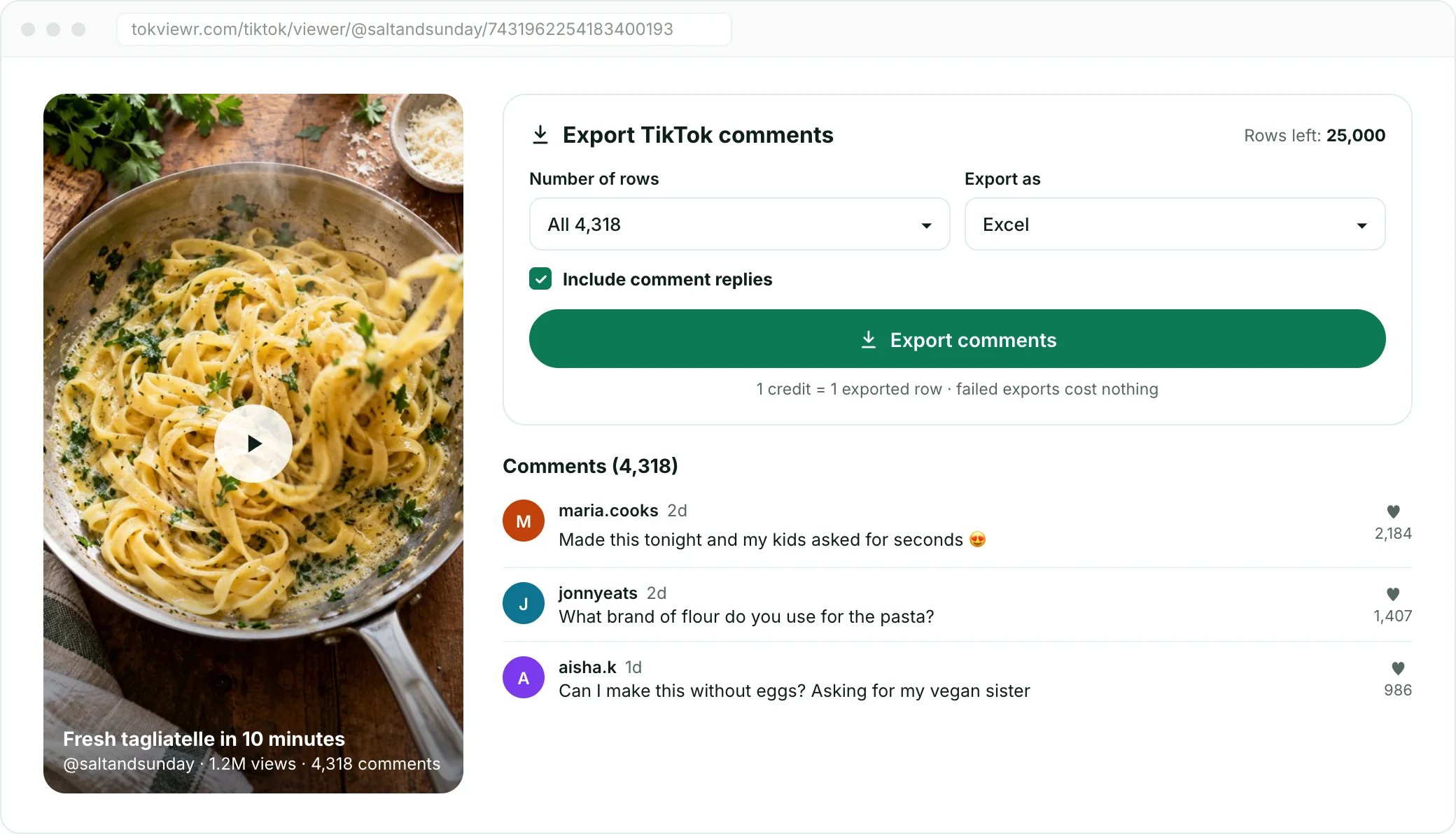
How to export TikTok comments
Three steps. No scraper, no API key and no TikTok account.

01Copy the video link
Open the video in TikTok, tap Share and copy the link, or copy it from your browser's address bar.

02Paste it into the exporter
Paste the link above. The video opens with its public comments, in the order TikTok returns them.

03Choose rows and download
Pick up to 5,000 rows, CSV or Excel and whether to include replies, then download the file.
Export TikTok comments into a clean spreadsheet
Every file has the same columns, so it opens straight in Excel, Google Sheets or your own scripts.
Usernames, text, dates and likes
Each row holds the comment ID, text, posting time in UTC, likes, reply count and the author's @handle.
Replies stay linked
Turn on replies and each one follows its comment, linked through parent_comment_id.
Excel keeps every digit
19-digit comment IDs are stored as text in the .xlsx file, so they are never rounded.

Export TikTok comments without coding
You do not need a scraper, an API key or Python to save comments. Paste a video link into the TikTok comment exporter, choose how many rows you want and download a ready spreadsheet. The file opens directly in Excel, Google Sheets or Numbers.
Every export is idempotent: if the download is interrupted and you retry the same export, you get the same file without paying twice. If TikTok cannot return the comments, the export fails without using any credits.

Columns in every TikTok comment export
Every file uses the same columns, whether or not you include replies, so scheduled imports and formulas keep working.
| Column | What it holds |
|---|---|
| comment_id | Unique ID of the comment |
| parent_comment_id | Empty for top-level comments; the parent ID for replies |
| text | The comment text |
| created_at | Posting time in UTC (ISO 8601) |
| likes | Like count |
| reply_count | Number of replies |
| pinned | true if the creator pinned the comment |
| user_id, user_handle, user_nickname | Who wrote it |
| image_urls | Links for image comments, space-separated |

Include TikTok replies in the export
Turn on “Include comment replies” and each comment is followed by its replies, linked through parent_comment_id. Replies are rows too: each costs one credit, and the row limit counts comments and replies together.

Rows, limits and file formats
Reading comments is free with a TokViewr account; exporting uses credits. One credit is one exported row. New accounts get 100 rows to try it, and one-time packs add more, from $19.99 for 25,000.
| What | Details |
|---|---|
| Viewing public pages | Free with a Google sign-in, 100 pages a day; no TikTok account |
| Rows on sign-up | 100, valid for 30 days |
| Rows per export | Up to 5,000 |
| File formats | CSV or Excel (.xlsx) |
| Cost | 1 credit = 1 exported row; a failed export costs nothing |

What people do with exported TikTok comments
A spreadsheet of comments is easy to sort, filter and count. Common uses:
- Sentiment checks and campaign reports for brand videos
- Collecting audience questions to plan new content
- Picking giveaway winners from a fixed list of entries
- Moderation reviews and research datasets of public comments

Why an export can have fewer rows than TikTok shows
The comment total on a video includes deleted, filtered and private-account comments that are not publicly available. The TikTok comment exporter saves the comments returned at the moment you export, so the file can hold fewer rows than the number under the video. Exports are capped at 5,000 rows per file and by your available credits.

Open the file in Excel or Google Sheets
Choose Excel to get a native .xlsx workbook with numbers already stored as numbers, so likes and reply counts sort correctly. Choose CSV for Google Sheets, Numbers or any script: the file is UTF-8 with a byte-order mark, so emoji and non-Latin text open correctly in Excel too.
Comment and user IDs are 19-digit numbers. The Excel file stores them as text, so every digit survives. If you open the CSV in Excel instead, import the ID columns as Text, or Excel will round them and they will no longer match the original comments.

What an exported TikTok comment looks like
Here is an example row with a few of the columns, so you know what to expect before you export. The values are illustrative; your file holds the real public comments of the video you choose.
| Column | Example value |
|---|---|
| comment_id | 7431962254183400193 |
| parent_comment_id | (empty for a top-level comment) |
| text | Where can I buy this? |
| created_at | 2026-10-20T14:03:11.000Z |
| likes | 82 |
| reply_count | 3 |
| user_handle | example_user |

Exporting very large TikTok comment sections
Each export starts at the top of the comment section and stops at 5,000 rows, or earlier if your credits run out. Videos with more comments than that give you the first 5,000 in the order TikTok returns them, with pinned comments first.
Choose the row count before you export: 100 or 500 rows are enough to sample the mood under a video, while 5,000 rows suit contests, research and full campaign reports. You only pay for the rows that end up in the file.

- Rows per export
- 5,000
- File formats: CSV and Excel
- 2
- Credit per exported row
- 1
- TikTok logins needed
- 0
TikTok viewer tools for profiles and lists
Open a public profile, video, follower or following list, repost feed, story or profile picture, and export the lists you need.
TikTok Profile Viewer
Exact profile stats, videos, reposts and follow lists.
TikTok Video Viewer
Watch public videos in your browser, no app.
TikTok Comment Viewer
Read comments and reply threads without a TikTok login.
TikTok Follower Viewer
See who follows any public account, then export.
TikTok Following Viewer
See which accounts anyone follows.
TikTok Repost Viewer
See and count the videos an account has reposted.
TikTok Story Viewer
Watch public stories before they disappear.
Bulk TikTok Video Downloader
Save every video from an account, without the watermark.
TikTok PFP Viewer
Open and download any PFP in full size.
TikTok comment exporter FAQ
TokViewr (tokviewr.com) is a TikTok comment exporter. Paste a public video link and download its comments, with replies if you want them, as a CSV or Excel file. It also opens public TikTok profiles and their follower and following lists without a TikTok login.
Paste the video link into the TikTok comment exporter on tokviewr.com, choose Excel and the number of rows, and download. One file holds up to 5,000 rows. For a larger comment section you get the first 5,000 in the order TikTok returns them.
New accounts get 100 export rows to try it, valid for 30 days. After that you buy rows once: 25,000 for $19.99, 60,000 for $29.99 or 200,000 for $59.99. There is no subscription, rows from a pack never expire, and one row costs one credit.
Yes. Every row has the comment ID, parent comment ID, text, posting time in UTC, likes, reply count, pinned flag, the author's user ID, @handle and nickname, and image links for image comments.
Yes. Turn on Include comment replies. Each reply is its own row, linked to its parent comment, and costs one credit like any other row. The row limit counts comments and replies together.
No. The exporter runs in your browser: paste a link, pick the options and download. You sign in to TokViewr with Google to keep your rows, but you never need a TikTok login.
Yes. Export as CSV, then in Google Sheets choose File, Import, Upload and select the file. The CSV is UTF-8, so emoji and non-Latin text come through intact.
The count under a video includes deleted, filtered and private-account comments that are not public. The exporter saves the public comments TikTok returns at that moment, up to 5,000 rows and your available rows.
Nothing is charged. Rows are only taken from your balance once the file is ready, and retrying the same export does not charge twice.
No. Only comments that are publicly visible can be exported. Private accounts stay private.
TokViewr only exports comments that are publicly visible. How you store and use the file is up to you: follow TikTok's terms and privacy laws such as the GDPR when you keep or share personal data.
Yes. The TikTok profile viewer, follower viewer and following viewer open public accounts and their lists without a TikTok login. The first 100 entries of every comment, follower and following list are free to view; a one-time pack unlocks the rest and the exports.
No. TokViewr is an independent tool. It is not affiliated with, sponsored or endorsed by TikTok, and it only works with content that is already public.
Export TikTok comments now
Paste a video link, pick CSV or Excel and download. Buy more rows once, with no subscription.